How to Localize Product Demos, Videos, and Presentations for Global Teams
A practical guide to multilingual product interfaces, RTL layouts, i18n decisions, and localized demo assets.
Published September 7, 2026 · By Kate Steinmeyer · Product Marketing


Product demo localization is not just translating the words in a recording, deck, or editor.
For global GTM teams, localization affects the interface people use to create demos, the language buyers see, the layout of presentations, the direction of right-to-left text, and the fallback experience when a language is not supported.
That matters because product demos, videos, and presentations are not static documents. They are creation tools, buyer-facing assets, and reusable sales enablement materials at the same time.
What's available now
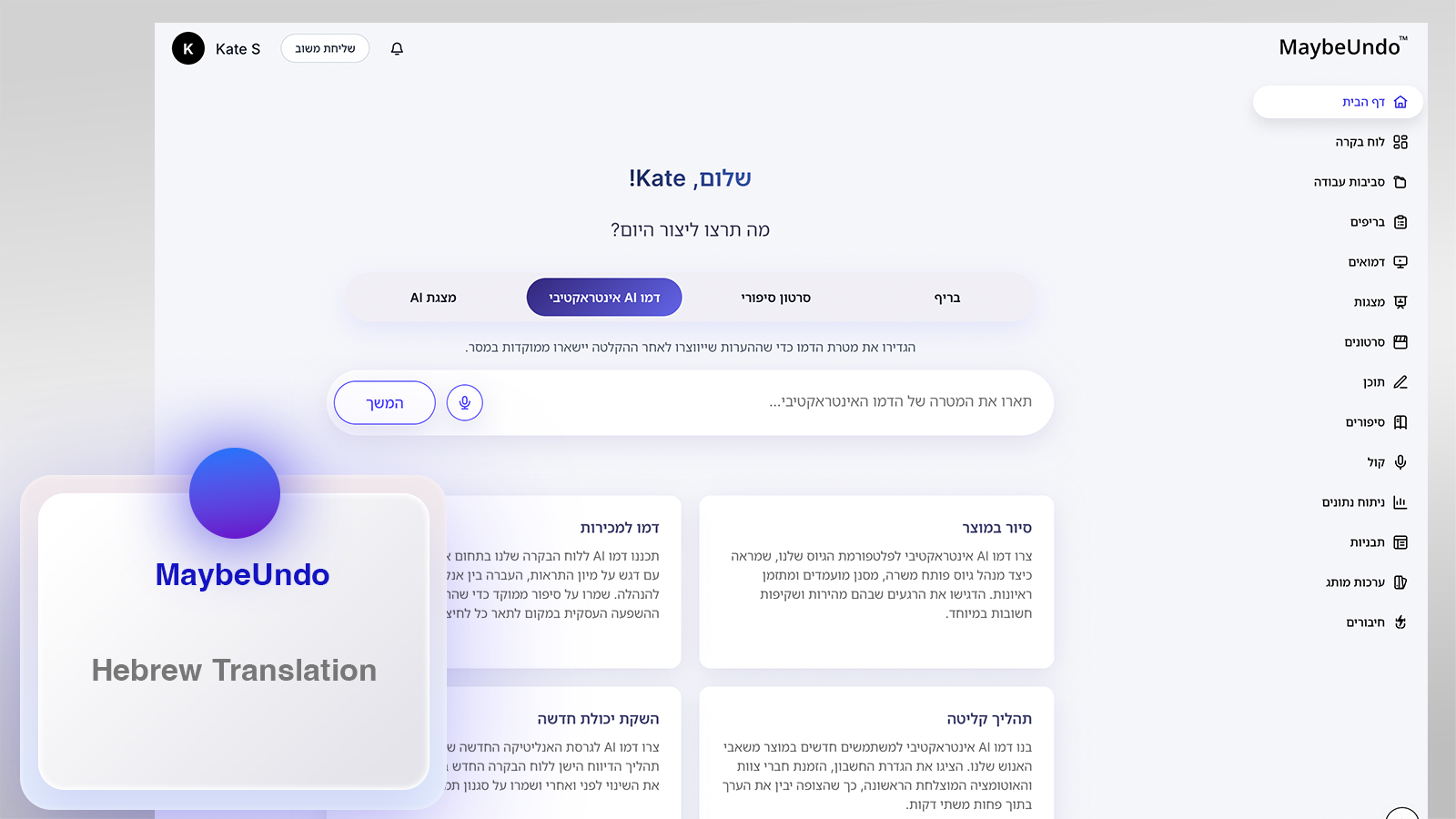
MaybeUndo is adding multilingual interface support across the app, with English, German, Spanish, French, Ukrainian, Russian, and Hebrew included in the current localization work.
Not every screen is complete yet. Some areas may still appear in English while translation coverage expands, especially in deeper creation workflows and newer product surfaces.
Users can choose an interface language in Settings. The app can also use a supported device language when available, then fall back to US English when the selected or detected language is not supported.
For the product update behind this work, see the multilingual interface language support changelog.
Changing the interface language should not rewrite existing project content. A workspace name, presentation title, demo script, uploaded screenshot, or buyer-facing callout should remain the creator's content unless the creator intentionally edits or translates it.
Hebrew RTL homepage dashboard
Why demo localization is harder than ordinary UI translation
Many SaaS products can start localization by translating navigation, buttons, forms, and help text. Demo and presentation tools have another layer: the user is creating content inside the product.
That creates two different language systems:
| Layer | What changes | What should stay stable |
|---|---|---|
| App interface | Navigation, menus, settings, empty states, tooltips, alerts | User content, uploaded media, project names |
| Demo content | Callouts, captions, scripts, slide text, voiceover text | The creator's intent and source material |
| Layout behavior | Text direction, alignment, menus, drawers, reading flow | Timelines, media order, brand assets when they are not directional |
A localized interface should help the creator work in their preferred language. It should not unexpectedly rewrite the demo they are building.
For example, a user might set the MaybeUndo interface to Hebrew while editing an English sales presentation. Another team might review a Spanish interface while keeping product screenshots, customer names, URLs, and pricing tables in English.
The language of the tool and the language of the asset are related, but they are not the same thing.
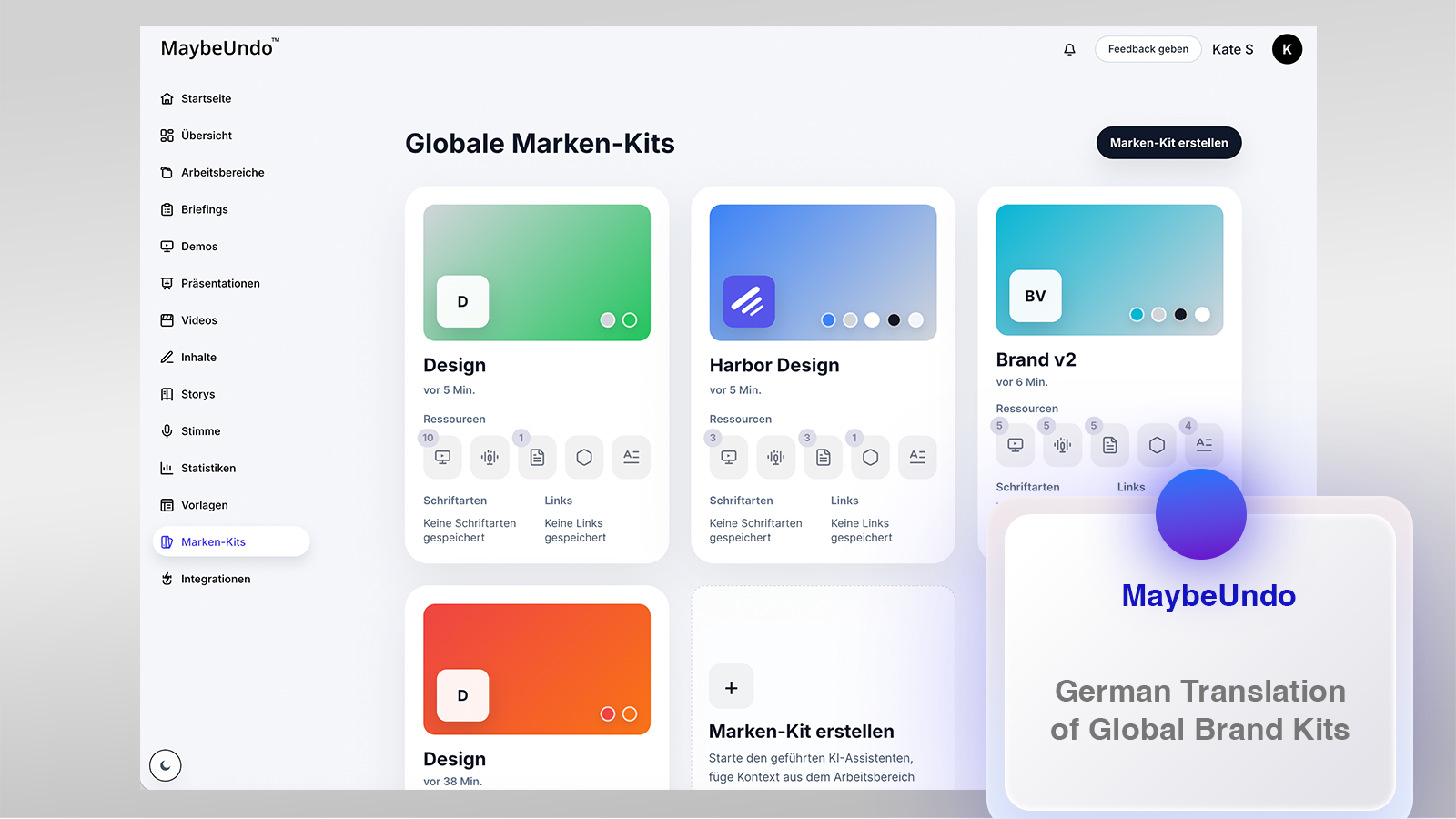
German Brand Kits dashboard localization
What RTL changes in demo and presentation editors
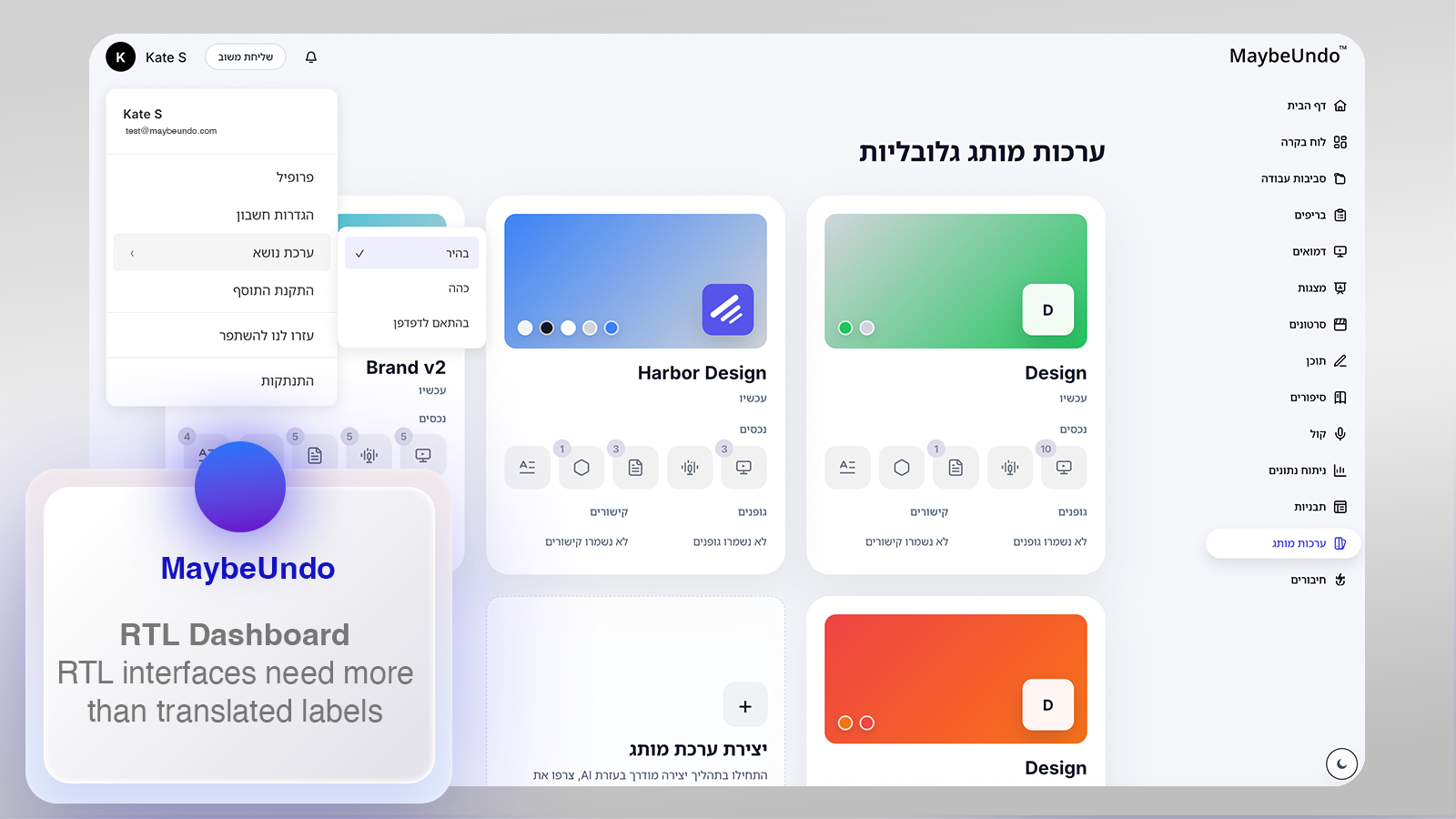
Right-to-left languages raise design questions that go beyond translated labels. Hebrew is MaybeUndo's first right-to-left interface language in the current localization work. The same design principles can prepare the product for other RTL languages, including Arabic, but that does not mean every RTL language is supported today.
An RTL interface may need text alignment, menus, side panels, breadcrumbs, drawers, and reading order to adapt. But creative tools also contain timelines, slides, recordings, screenshots, charts, logos, and product UI captures.
Those pieces should not all be mirrored automatically.
Hebrew Brand Kits RTL layout
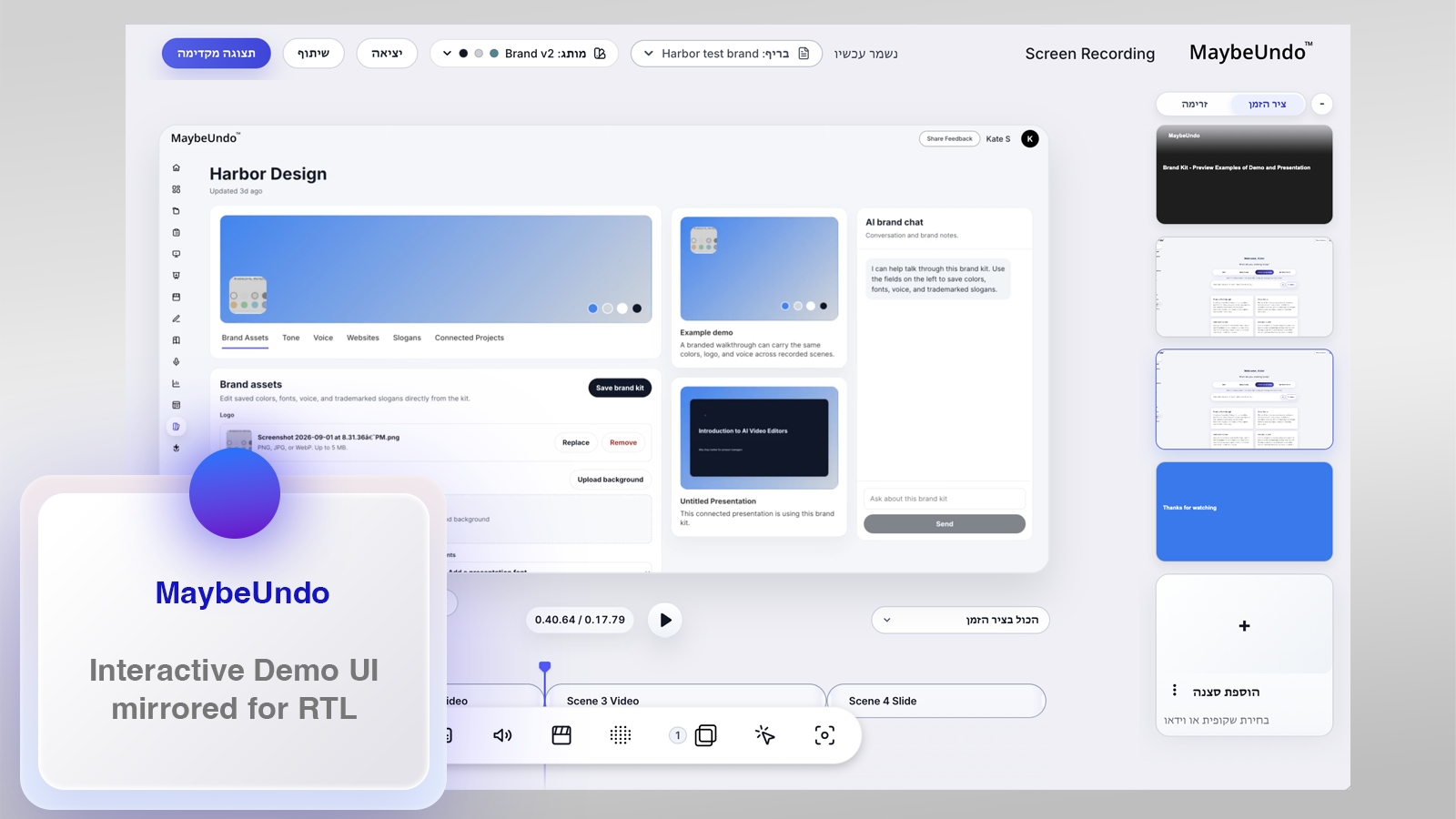
In a video demo editor, time usually still moves from left to right. The beginning of the recording stays at the left edge of the timeline, and later moments move to the right. Reversing that behavior just because the interface language is RTL can make editing harder, especially for teams that work across multiple languages.
Hebrew demo editor with left-to-right timeline
In a presentation editor, slide order, image composition, brand marks, play icons, and imported screenshots may also need different rules from text labels. Some elements should follow the selected interface language. Others should preserve the structure of the content being created.
That is why RTL support needs product judgment, not only a global CSS direction switch.
How demo localization is different from i18n
i18n is the technical foundation that lets software support multiple languages, regions, formats, and text directions. It helps a product handle translated strings, locale-aware dates and numbers, saved language preferences, and right-to-left rendering.
Demo localization is the product and content layer on top of that foundation.
For a demo editor, video editor, or presentation tool, localization includes the interface language, the buyer-facing script, the translated callouts, the layout of slides, the direction of text, the behavior of menus, and the QA process before an asset is shared.
That distinction matters because a technically internationalized app can still create a weak localized demo experience. The UI might support Hebrew or French, but the editor may still break long labels, misplace menus, reverse the wrong elements, or mix translated controls with unchanged error states.
Good i18n makes multilingual support possible. Good demo localization makes the created asset trustworthy.
Why this matters for global GTM teams
Product demos often move across markets faster than the product interface itself.
A product marketing team may launch in English first, then need sales follow-up assets in German, Spanish, or French. A presales team may need a buyer-led demo that explains the same workflow to different regions. A customer success team may need onboarding materials that match the language expectations of a local account team.
If the demo tool does not handle localization well, teams end up with fragile workarounds:
- duplicated demos for every language
- screenshots that become outdated after each translation pass
- slide layouts that break when words get longer
- callouts that wrap awkwardly on smaller screens
- RTL labels inside layouts designed only for English
- manual QA across every exported video, deck, and share link
The result is slower content production and less confidence in the final asset.
Localized demo creation should reduce that friction. The editor should help teams adapt the experience without forcing them to rebuild the story from scratch.
What to look for in a localized demo or presentation editor
When evaluating demo software, AI presentation tools, or product video editors for international teams, look beyond whether the marketing site says "multiple languages."
Ask what actually changes inside the product.
| Question | Why it matters |
|---|---|
| Can users choose their interface language manually? | Device detection is useful, but explicit control prevents confusion. |
| Does the app fall back gracefully when a language is unsupported? | A predictable English fallback is better than broken or mixed UI. |
| Does the UI handle longer translated labels? | German, French, and Spanish can expand navigation and button text. |
| Is RTL layout handled thoughtfully? | Text direction, menus, drawers, and editor surfaces may need separate rules. |
| Does changing the interface language preserve user-created content? | Project titles, scripts, slides, and demo copy should not change unexpectedly. |
| Are small UI states translated too? | Loading states, errors, tooltips, and confirmation dialogs shape trust. |
| Can exported assets be reviewed by language? | Teams need QA before sharing demos with buyers. |
This is where demo editors and presentation editors often need deeper localization support than ordinary productivity apps. The asset being created may have its own audience, language, and layout rules.
How MaybeUndo thinks about multilingual product storytelling
MaybeUndo is built around a simple idea: one product story should be reusable across demos, videos, presentations, and follow-up assets.
Localization has to support that workflow.
If a team creates a product demo in one language, they should be able to adapt the surrounding experience for another market without losing the original structure. If a creator changes the app interface language, their project content should stay intact. If the interface is shown in an RTL language, the editor should make thoughtful decisions about what adapts and what remains stable.
That is especially important for AI-assisted demo creation. AI can help generate scripts, callouts, summaries, and presentation copy, but the product still needs clear boundaries:
- interface translation is not the same as content translation
- RTL text direction is not the same as reversing every visual element
- localizing a demo is not the same as rebuilding it from scratch
- device language detection should not replace user control
Good localization keeps the creator oriented.
Practical framework for localizing demo assets
Use this framework before turning one product story into localized demo assets.
| Step | What to check |
|---|---|
| Start with the source story | Define the problem, workflow, outcome, audience, and CTA before translating. |
| Separate UI language from asset language | Decide whether the editor interface, demo content, or both need localization. |
| Test longer labels | Check navigation, cards, buttons, modals, and mobile layouts in German, Spanish, and French. |
| Review RTL behavior | Inspect Hebrew layouts today; use the same checklist to prepare for other RTL languages, including Arabic. |
| Preserve timelines and media order | Do not reverse time-based or imported content unless the asset itself requires it. |
| Keep fallback behavior visible | Make sure unsupported languages default cleanly to US English or another approved fallback. |
| QA the final export | Review the shared demo, video, deck, or image asset in the language buyers will see. |
The goal is not to make every market feel like a separate content operation. The goal is to keep one product story adaptable.
Example: Hebrew RTL review for a demo editor
Hebrew is a useful test case because it quickly reveals whether localization is only text replacement or real interface design.
In an RTL review, a team should check:
- whether navigation labels align naturally
- whether dropdowns and menus open in a predictable direction
- whether mixed-language text with numbers, URLs, and product names remains readable
- whether icons with direction still make sense
- whether the video timeline preserves the direction of time
- whether slide or canvas content is protected from accidental layout changes
This kind of review is not just visual polish. It protects the usability of the editor and the quality of buyer-facing assets.
Conclusion
Global teams need product demos, videos, and presentations that can travel across languages without becoming fragile.
That requires more than translated labels. It requires multilingual interface settings, thoughtful RTL behavior, predictable fallbacks, and a clear separation between the app interface and the content being created.
MaybeUndo is applying that thinking to product storytelling tools so teams can create reusable demo assets for more markets without rebuilding every workflow from the beginning.
FAQ
What is product demo localization?
Product demo localization is the process of adapting a demo, video, presentation, or related buyer-facing asset for a specific language, region, or reading direction. It includes translated copy, layout review, interface settings, right-to-left behavior when needed, and final QA before the asset is shared.
How is demo localization different from i18n?
i18n is the technical foundation that lets software support multiple languages, regions, formats, and text directions. Demo localization is the product and content layer on top: translated UI, localized scripts, callouts, slides, video captions, RTL layout choices, and review of the final asset.
Should RTL support reverse a video demo timeline?
Usually no. In a demo or video editor, the surrounding interface may adapt for an RTL language, but time-based media often remains easier to edit when the beginning stays on the left and later moments move to the right.
Can the app interface language be different from the demo content language?
Yes. The interface language and the content inside a project should be treated as separate layers. Changing the app language should not rewrite project names, scripts, screenshots, slide text, or buyer-facing callouts unless the creator intentionally edits or translates them.
Which RTL language is MaybeUndo working with first?
Hebrew is MaybeUndo's first right-to-left interface language in the current localization work. The same layout principles can help prepare the product for other RTL languages, including Arabic, but that does not mean every RTL language is supported today.